How I learned 500+ new words in a month using netflix double subtitles
Published in January 25, 2026
Forget the tedious vocabulary books and expensive language courses. The hours you spend binge-watching on Netflix are not wasted time. Instead, they are your untapped potential for language mastery.
The key to this transformation is a powerful feature. It is often overlooked: Netflix double subtitles. This technique seamlessly merges entertainment with effective education. It turns passive viewing into an active learning experience.

In this article, I will walk you through my personal journey. I'll detail exactly how using Netflix double subtitles allowed me to learn over 500 new, practical words. I did this in just one month. I achieved it while watching an entire season of House of Cards.
This comprehensive guide covers everything you need to get started. We will explore the best browser extensions. We will also provide a step-by-step setup tutorial.
Furthermore, I'll share my exclusive four-week learning strategy. It is designed to maximize retention. I will also provide solutions to common troubleshooting issues.
Prepare to revolutionize your study method. Mastering Netflix double subtitles is the first step. It turns your screen time into your greatest language asset.
1.Why Traditional Learning Is Inefficient: The Future of Language Is Immersion
1.1. The Pitfalls of Traditional Methods: The Curse of the Forgetting Curve
You have likely experienced this before. You spend an afternoon memorizing 50 new words. Then, you forget half of them the next day. This isn't a flaw in your memory. It is a result of learning without context.

Research by German psychologist Hermann Ebbinghaus shows a grim reality. We can forget up to 70% of isolated information within 24 hours. Rote memorization is like building a sandcastle. It is inefficient and temporary because it lacks the strongest adhesive: context.
| Time Elapsed | Retention Rate |
|---|---|
| Immediate | 100% |
| 20 Minutes | 58% |
| 1 Hour | 44% |
| 9 Hours | 36% |
| 1 Day | 33% |
| 2 Days | 28% |
| 6 Days | 25% |
| 31 Days | 21% |
1.2. The Comprehensible Input Hypothesis: The Golden Rule of Language Learning
Renowned linguist Stephen Krashen proposed the "Comprehensible Input" hypothesis. He argued that language acquisition occurs naturally. It happens when we understand the message's content.
It does not happen by consciously memorizing grammar rules. Simply put, if you can understand it, you are learning. This explains why Netflix's double subtitles are so effective. It creates a perfect environment for comprehensible input.
This approach changes the game for Netflix language learning. Perhaps you are studying content with subtitled Japanese. Or you may be watching shows with Netflix Chinese subtitles. Either way, you are absorbing the language naturally.
1.3. How Netflix Becomes Your Ultimate Immersive Classroom
Netflix offers a massive library of authentic dialogue and cultural context. However, this content can be too challenging for learners without assistance.
This is where dual language subtitles become the critical bridge. They create an instant connection between your native language and your target language.
By using Netflix double subtitles, you are no longer just a passive viewer. You are actively engaged in an immersive study session. This bilingual subtitles Netflix model allows your brain to process linguistic information efficiently.

You can do this while you enjoy the plot. In essence, Netflix double subtitles transform entertainment into valuable learning time. It makes it an indispensable tool for the modern language learner.
2.What Exactly Is netflix double subtitles?
2.1. Definition: More Than Just Two Lines of Text
Technically, Netflix's double subtitles is a feature enabled by third-party browser plugins. The principle is simple. While you watch Netflix, a Netflix subtitle extension loads a second line of subtitles. It displays them above or below the player's native subtitle track. This results in dual language subtitles appearing simultaneously on your screen.
This process is fully automated. It ensures both subtitle tracks scroll in perfect sync. It's not just two lines of text; it's a powerful, real-time language-learning interface. Understanding how to add two subtitles is the first step toward unlocking this efficient study method.
Users have been requesting this functionality for years; for example, this Reddit thread on enabling dual subtitles discusses early community efforts and workarounds before modern extensions made netflix double subtitles easy to implement. (is there a way to enable dual subtitles)
2.2. Why Is It So Effective? The Psychology Behind It
The effectiveness of Netflix's double subtitles stems from its alignment with our brain's learning mechanisms. First, it provides instant feedback. When you hear a new word in a show, a glance down gives you the translation in your native language. This eliminates the need to pause and look it up.
Second, it promotes contextual memory. Think about connecting the word "resignation" to the scene, expression, and tone of a character.

Saying it in House of Cards is far more memorable than seeing it on a vocabulary list. This bilingual subtitles Netflix model anchors abstract words to vivid, emotional moments.
Finally, it significantly reduces cognitive load. Watching with only foreign-language subtitles can create anxiety. But the safety net provided by Netflix's double subtitles allows you to relax and enjoy the story. Learning happens effortlessly in the background.
2.3. How Is This Different from Watching Downloaded Bilingual Movies?
Using Netflix double subtitles is fundamentally different from watching a downloaded movie with hardcoded dual subtitles. The biggest distinction is interactivity.
Most netflix two subtitles extensions allow you to hide or switch either subtitle track on the fly. Some even let you click on individual words for definitions.
Furthermore, it is seamlessly integrated with the Netflix platform. This makes setup and use incredibly convenient.
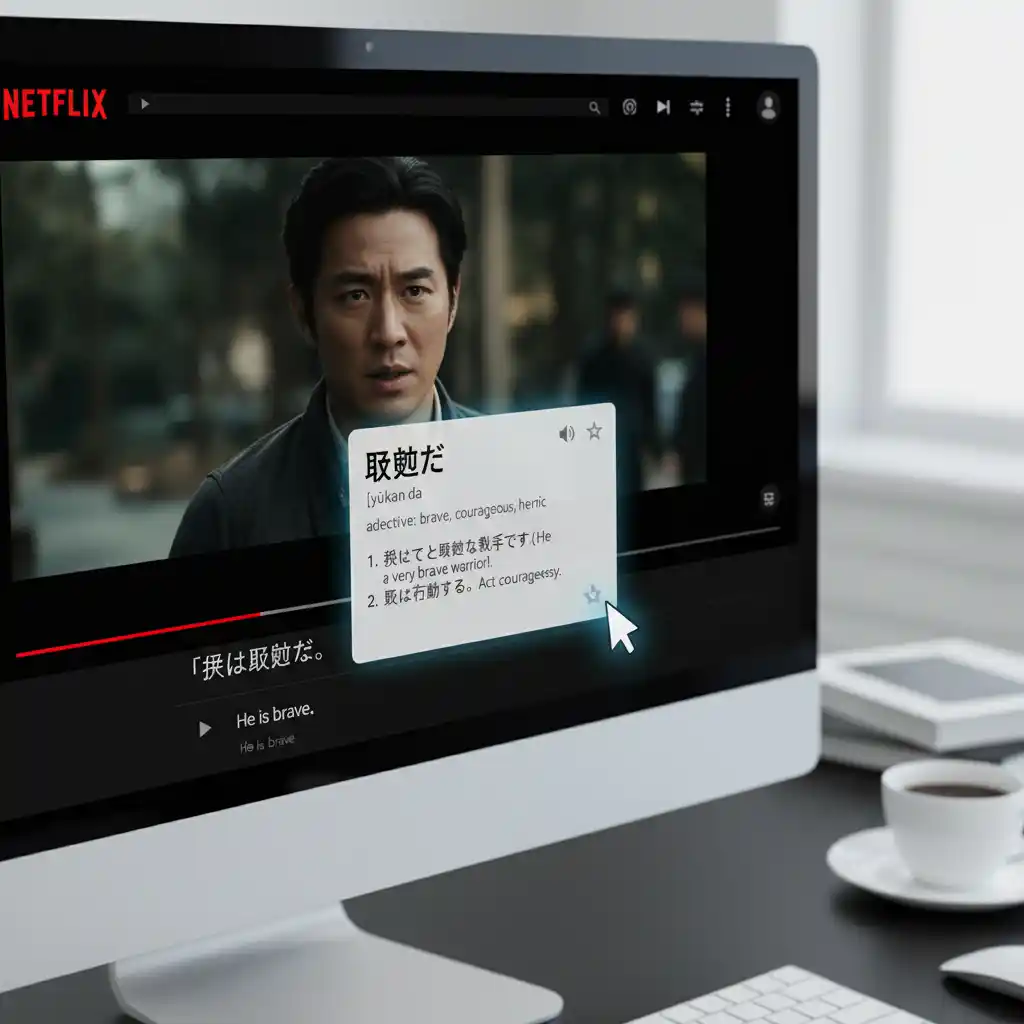
You no longer need to hunt for and download matching subtitle files. This tailored netflix double subtitles experience is something traditional methods simply cannot match.
3.Your 3-Minute Guide to Enabling Netflix double subtitles
3.1. Step One: Choose the Right Browser Extension
The first step on your Netflix double subtitles journey is selecting a safe browser plugin. Many options exist. However, I recommend starting with one of two popular tools.
These Netflix subtitle extension tools are Language Reactor or NflxMultiSubs. They are feature-rich and have large user bases. They are also updated frequently.
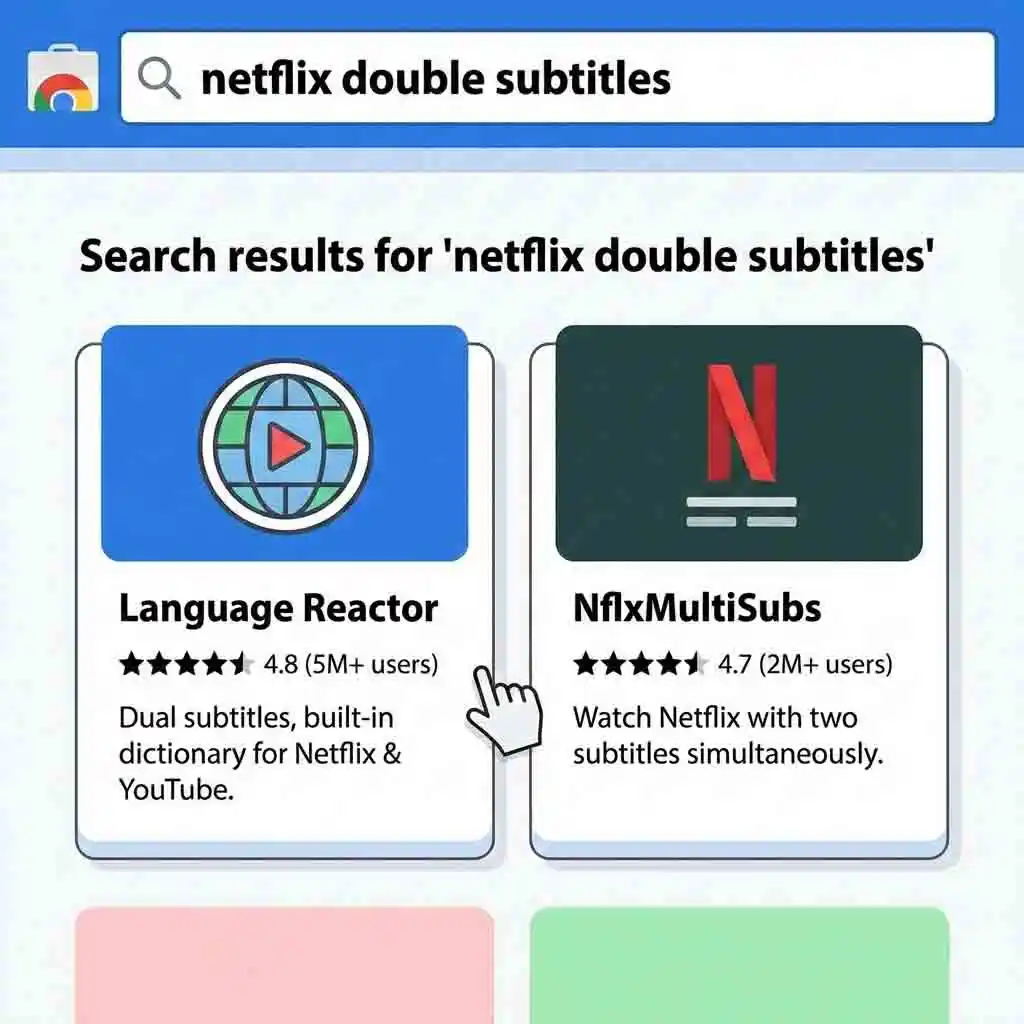
Most importantly, always download extensions from official sources. Use the Chrome Web Store or Firefox Add-ons. This ensures the plugin is authentic.
It keeps you free from security risks. A simple search for "double subtitles netflix" in the store will lead you right to them.
To see exactly how to set this up, watch this YouTube tutorial on Language Reactor, which provides a visual guide on installing and using the extension to enable netflix double subtitles for language learning. (The Ultimate Guide to Using Language Reactor)
The Ultimate Guide to Using Language Reactor
YouTube Video
3.2. Step Two: Installation and Authorization
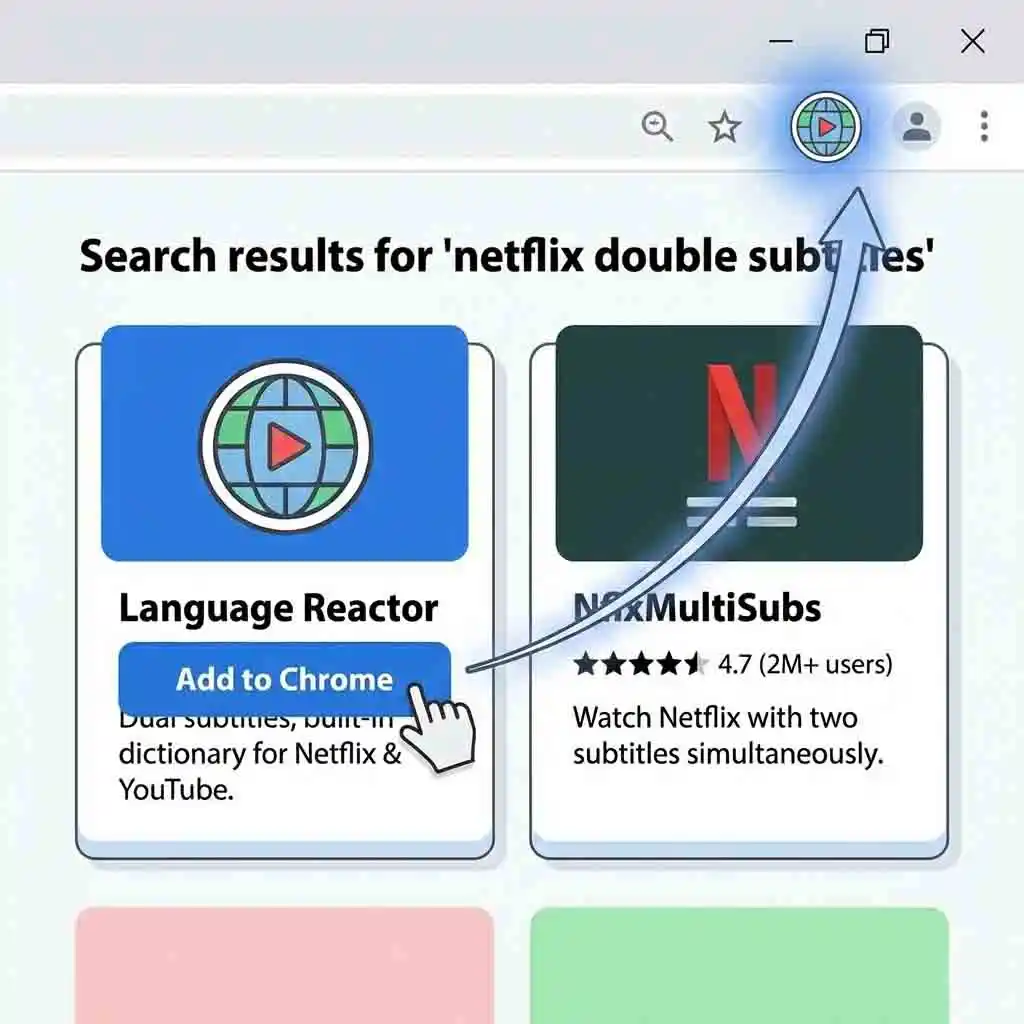
The installation process is straightforward. It takes less than a minute, even for beginners. In Google Chrome, navigate to the extension's page. Click the "Add to Chrome" button in the top-right corner. A permission pop-up will appear. Click "Add extension" to confirm.
Once installed, you will see the icon in your toolbar. This confirms your browser has Netflix double subtitles capabilities. The Netflix two subtitles extension is now ready for you to activate.
3.3. Step Three: Personalize Your Settings in Netflix
Now, open the Netflix website. Play any movie or show. You will notice new setting options in the video player. This is the plugin at work. You can usually find a gear icon or language options. Look near the player's timeline at the bottom.
Click on it. A menu will appear. Select a secondary subtitle language. This is the core step for adding two subtitles. Choose your native language. The netflix double subtitles effect will appear right away.
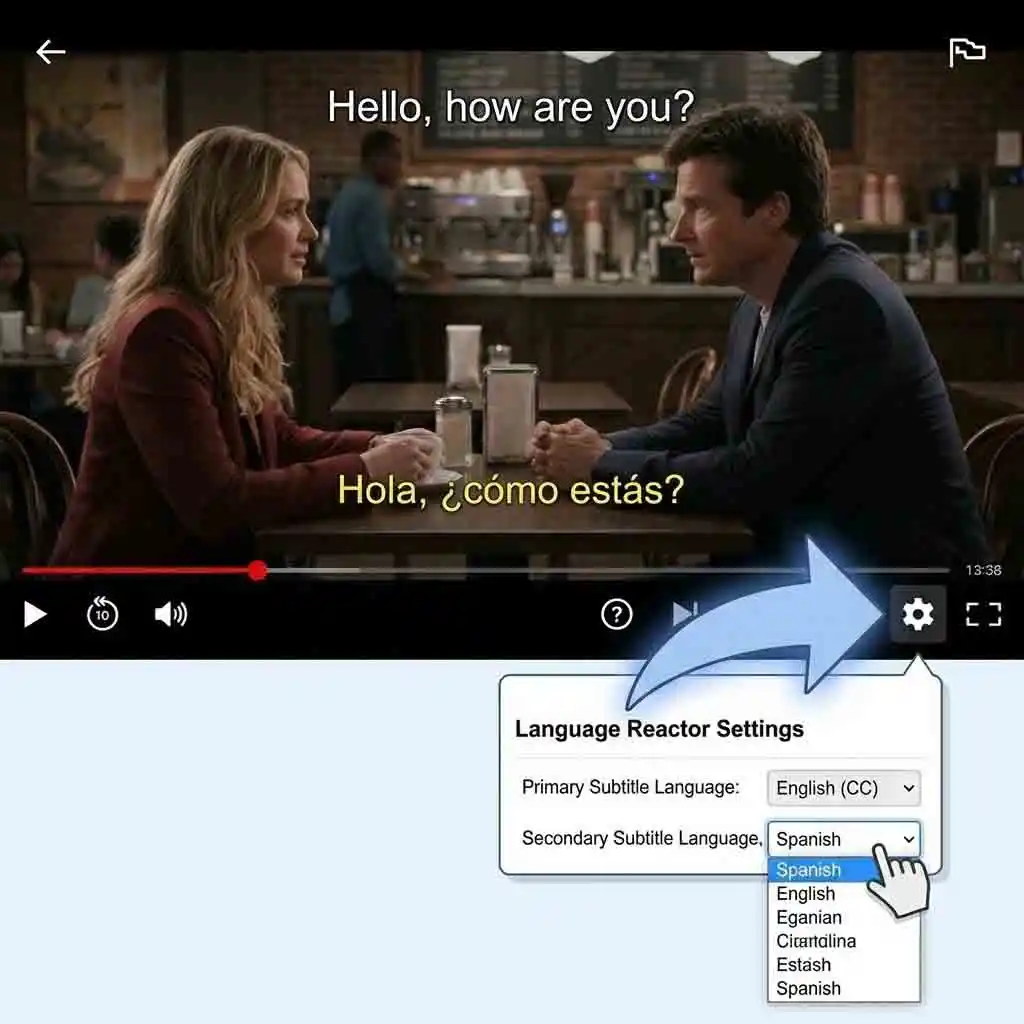
Most plugins also offer extensive customization. You can adjust the font size, color, and position. This answers any questions about how to change Netflix subtitles.
Personalize these settings. This ensures your netflix double subtitles viewing experience is optimized for you. The entire setup process takes no more than three minutes.
For a detailed walkthrough on customization, check out this YouTube guide on showing two sets of subtitles, which demonstrates how to adjust settings to perfectly display netflix double subtitles according to your preferences. (How to Show 2 Sets of Subtitles on Netflix with Chrome Extension)
How to Show 2 Sets of Subtitles on Netflix with Chrome Extension
YouTube Video
4.My Four-Week Method: From Viewer to Learner
4.1. Week One: Passive Input Without Pressure (Goal: Adapt and Enjoy)
The goal of the first week is to adapt, not study. Turn on Netflix double subtitles. Pick a show that interests you. Watch as you would usually.
Do not force yourself to memorize words or pause. Your only task is to get comfortable with the dual language subtitles. Start absorbing the rhythm of the target language.

4.2. Week Two: Active Noticing and Marking (Goal: Capture New Words)
In week two, become more active. Prepare a notebook or an app like Notion. Watch with Netflix double subtitles. If a new word appears often or sparks interest, pause the video. Write it down.
You only need to record the word and a simple context. For example: "Protagonist - used when the main characters were discussing a movie."

4.3. Week Three: Intensive Watching and "Mining" (Goal: Deepen Understanding)
This is the most critical phase of Netflix language learning. Each day, choose a 10-15-minute segment for intensive viewing. During this time, your goal is to "mine" every linguistic detail.
Dig deeper into the usage of every new word or interesting expression. During my process, I averaged 15-20 vocabulary items per day. I accumulated over 100 core expressions in a week. This netflix double subtitles method is efficient for vocabulary building.
To enhance this process, you can use tools to export scripts; this YouTube video on free transcripts and practice explains how to leverage Language Reactor to access and study full transcripts alongside your viewing when using netflix double subtitles. (FREE Transcripts Language Practice on Netflix)
FREE Transcripts Language Practice on Netflix
YouTube Video
4.4. Week Four: Review and Application (Goal: Consolidate and Produce)
The learning loop closes with review. Use spaced repetition software like Anki. Spend 15 minutes each day reviewing words from the past three weeks. Also, try practicing without your "crutch." Go back to scenes you have watched.

Try turning off subtitles on Netflix for your native language. Leave only the target language visible. Test your comprehension. For an even greater challenge, try shadowing. This means mimicking the characters' pronunciation. This active application is the final, powerful step of the Netflix double subtitles method.
| Week | Focus Activity | Vocabulary Growth |
|---|---|---|
| Week 1 | Passive Input (Adaptation) | ~50 words (recognized) |
| Week 2 | Active Noticing | ~150 words (total) |
| Week 3 | Intensive Mining | ~300 words (total) |
| Week 4 | Review & Application | 500+ words (solidified) |
5.What to Do When Netflix's Native Subtitles Aren't Enough
5.1. The Pain Points: 3 Situations You Might Encounter
The Netflix double subtitles feature is powerful. However, it relies on official subtitles provided by Netflix. Sometimes, you will face challenges. First, you might watch a niche film. Or, you might learn a less common language. Netflix may not offer subtitles in your native or target language.
Second, the official translation quality might be poor. It may contain errors. You should use a superior, fan-made version. Third, you have other materials, such as downloaded movies or course videos (with subtitles). You may want to watch them with dual subtitles as well.
This frustration is common among learners; see this Reddit discussion on dual subtitle challenges, where users share their experiences and tips for overcoming limitations when official netflix double subtitles fall short. (Netflix Dual Subtitles)
5.2. The Solution: Download Netflix Subtitles and Customize Them
In these scenarios, the standard netflix double subtitles method falls short. The solution is to take matters into your own hands. You can create custom subtitles.
The first step is to get the original subtitle file. You can use various Netflix subtitle downloader tools. Use them to download Netflix subtitles, usually in .srt format.
But this leads to a new problem. The downloaded file is monolingual. We need to convert it into a bilingual format. Then we can use it with a netflix custom subtitles extension.
5.3. Tool Recommendation: Batch-Create High-Quality Dual Subtitles with AI Subtitle Translator
I discovered a tool called ai subtitle translator. It solved my problems. It is a powerful tool for translation and merging. Its features are focused.
They are efficient. First, it supports all major formats, such as .srt and .ass. Second, it processes entire seasons at once. Drag and drop the files. You get bilingual versions within minutes.
The tool supports translation between over 100 languages. The AI engine understands slang. It grasps colloquialisms. It is superior to standard machine translation.

The results are fluid. Imagine you found a specific file for full house thai subtitles download. But you need English too. This tool merges them for you.
This is a professional online AI subtitle translation platform that supports seven mainstream subtitle formats including SRT, VTT, and ASS. It can instantly translate a single subtitle file into over 100 languages with simple operation—just drag and drop to upload. It is an efficient tool for video creators and language learners to create multilingual subtitles. (Translate your subtitle files into over 100 languages)
5.4. Simple Tutorial: How to Make Your Own Dual Subtitle Files
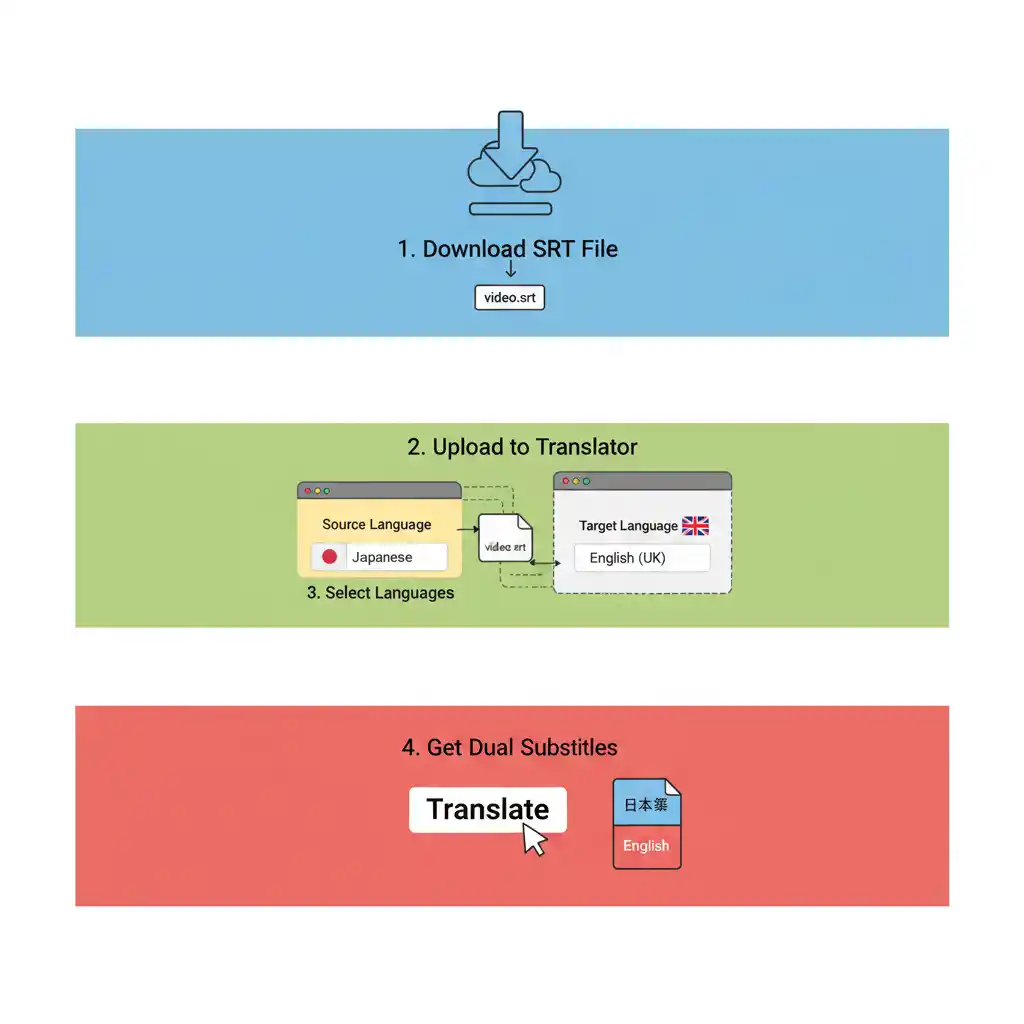
Creating your own netflix double subtitles files is fast. Use the AI subtitle translator. It takes four steps:
(1) Download: Use a Netflix subtitles downloader. Get the original monolingual file. This is useful for subtitles for movies from other sources.
(2) Upload: Open the ai subtitle translator website. Drag your downloaded Netflix subtitles file (.srt) into the upload area.
(3) Select: Set the original language. Choose the target language.
(4) Generate: Click "Translate." The tool works on its own. It creates a bilingual file for you to download. You can load this file into a video player. You can also use a Netflix custom subtitles extension. This creates a perfect netflix double subtitles learning experience.
6.Frequently Asked Questions (FAQ): Clearing All Your Obstacles
6.1. Q1: What should I do if my Netflix double subtitles extension stops working?
This is a common issue. It is usually easy to fix. First, clear your browser's cache. Clear the cookies, too. If the problem persists, check for updates. Look for an update for the extension. Finally, turn off other extensions. Conflicts between plugins can cause the Netflix double subtitles feature to fail.
6.2. Q2: Can I use dual subtitles on my phone or smart TV?
Most netflix subtitle extension tools are for desktop browsers. They work on Chrome and Firefox. Mobile apps do not support third-party plugins. Smart TV systems do not support them either. You cannot enable Netflix double subtitles on them directly.
However, there is a workaround. Use screen casting. Mirror the dual-subtitled video from your computer to your TV. This allows you to enjoy double subtitles on Netflix on a larger screen.
Mobile users often look for alternatives, as seen in this Reddit query about dual subtitles on tablets, where the community discusses current limitations and potential workarounds for handheld devices. (Netflix dual subtitles on iPhone or tablet)
6.3. Q3: Can I adjust the font size or style of the subtitles?
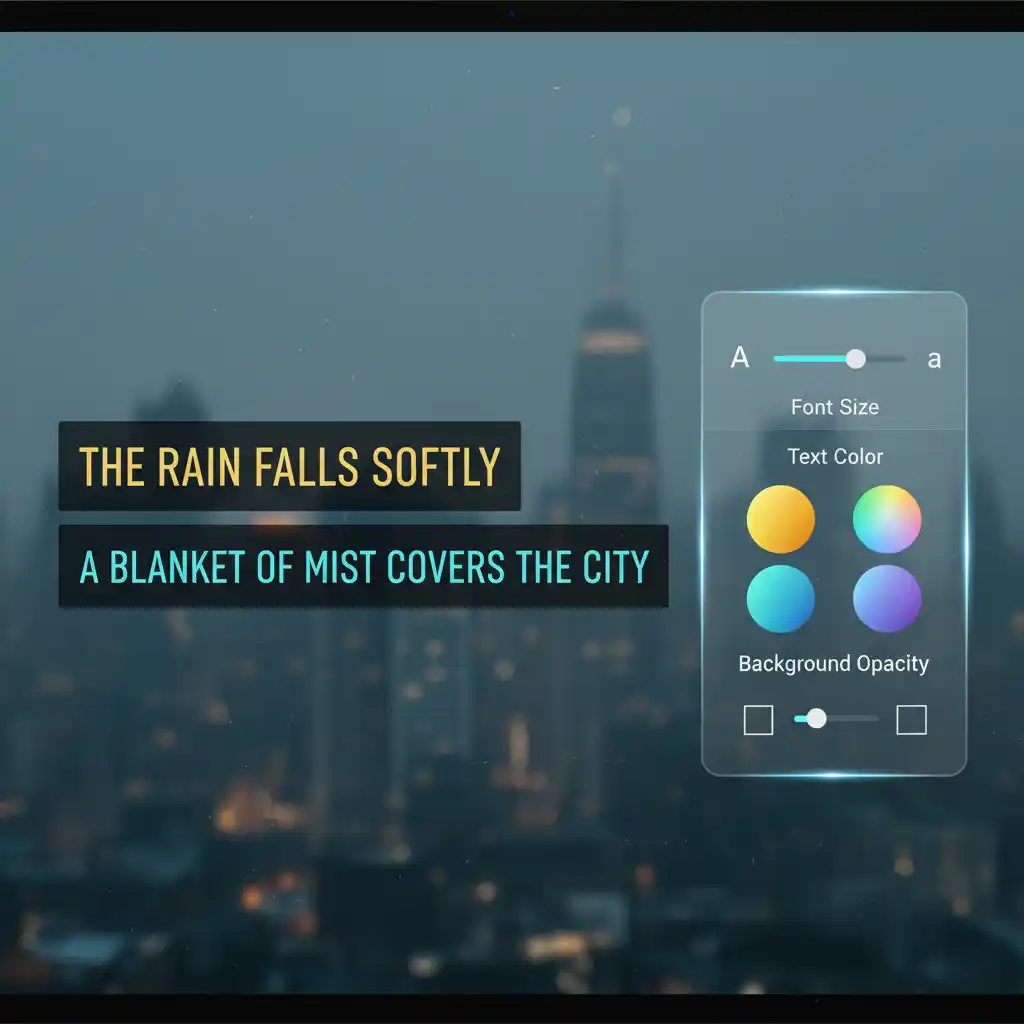
Yes, you can. This is a key strength of a good plugin. Think about how to change caption size on youtube pc. These extensions follow similar logic. They offer a wide range of options.
You can change the font. You can adjust the color and size. You can also change the background. Customize the Netflix double subtitles interface. Make it suit your reading preferences.
6.4. Q4: Which shows are best for language learning?
Maximize your learning efficiency. Start with dialogue-heavy dramas. Sitcoms like Friends or Modern Family are great. The language is close to everyday conversation. Avoid action movies initially. Sci-fi blockbusters are less effective.
This applies to anime too. Watching Netflix with Japanese subtitles helps you learn faster. It is better than standard subtitled Japanese because you see both languages. Choose content that interests you. This is the key to sticking with your netflix double subtitles routine.
Many learners document their progress on social media; for instance, this Instagram reel on learning Italian with Netflix shows how picking an engaging show and using dual subtitles can turn daily binge-watching into an efficient study session. (Day six of sharing how I learnt Italian)
Day six of sharing how I learnt Italian
Instagram Reel
7.Conclusion and Call to Action
Netflix's double subtitles are more than a tool. It is a revolutionary method. It transforms entertainment into learning. It turns a tedious task into a journey of fun. Gaining 500 new words is only the beginning. The best part is the habit. It is sustainable and enjoyable. This is precious.
Stop hesitating. Install a subtitle extension today. Pick your favorite show. Begin your first week of "pressure-free input." Your language skills will improve. You won't even notice it happening. Go and try Netflix double subtitles now.